
Setting up IT infrastructure for new offices is crucial for seamless operations. This essential guide will help you optimize connectivity, security, and efficiency.
Understanding IT Infrastructure: What You Need to Know
Setting up IT infrastructure for a new office involves more than just plugging in a few computers and installing software. It is a comprehensive process that lays the foundation for your company’s digital operations.
IT infrastructure includes all the hardware, software, network resources, and services required to operate and manage an enterprise IT environment. This covers servers, storage systems, networking devices, software applications, and data management tools.
The importance of IT infrastructure cannot be overstated. It acts as the backbone of modern businesses by enabling communication, collaboration, and data management. Without a well-designed system, businesses may face downtime, security risks, and operational inefficiencies.
In addition to hardware and software, IT infrastructure also includes policies, processes, and procedures such as user access control, data backup strategies, disaster recovery planning, and cybersecurity measures.
Key Components of IT Infrastructure
To build a strong IT infrastructure, it is essential to understand its core components. These elements work together to support business operations effectively.
Hardware
Hardware forms the physical foundation of IT infrastructure. It includes servers, computers, routers, switches, and other networking devices.
Servers play a critical role as they host applications, databases, and services used daily. Choosing reliable and scalable hardware ensures better performance and long-term efficiency.
Software
Software includes operating systems, applications, and business tools that run on your hardware.
These tools help employees perform tasks efficiently, including communication, data management, and workflow automation. Selecting the right software depends on your business needs, compatibility, and ease of use.
Networking
Networking connects all devices within the organization and enables communication and data transfer.
This includes routers, switches, and access points. A well-designed network ensures smooth connectivity, better performance, and secure access to resources.
Data Storage
Data storage solutions allow businesses to store and manage information securely.
This includes hard drives, SSDs, and cloud storage. Effective strategies involve regular backups, redundancy, and disaster recovery planning to protect data from loss.
Assessing Your Business Needs for IT Infrastructure
Before setting up your IT infrastructure, it is important to assess your business requirements.
Start by evaluating your current and future goals. Identify the core functions of your business and the technology needed to support them.
For example, businesses that rely on data analysis require strong storage and processing systems, while remote teams need secure and reliable network access.
Consider the size and scale of your organization. Small businesses may need basic setups, while larger organizations require more advanced and scalable solutions.
Budget planning is also essential. Allocate resources wisely across hardware, software, networking, and storage based on priority.
Planning Your IT Infrastructure Layout
Proper planning ensures efficiency and reduces technical issues.
Begin by designing the physical layout of your office. Decide where servers, workstations, and networking devices will be placed. Consider power supply, cooling, and cable management.
Next, plan the logical structure of your network. Choose a suitable topology such as star, mesh, or hybrid based on your needs.
Security should also be included in the planning stage. Implement firewalls, access controls, and network segmentation to protect sensitive data.
Choosing the Right Hardware and Software
Selecting the right technology is crucial for performance and scalability.
When choosing hardware, consider workload requirements. Businesses using heavy applications need high-performance systems, while cloud-based setups may require simpler devices.
Ensure scalability by selecting systems that can be upgraded as your business grows.
For software, choose applications that are easy to use, compatible, and supported by reliable vendors. Also consider licensing costs and long-term maintenance.
Networking Essentials for New Offices
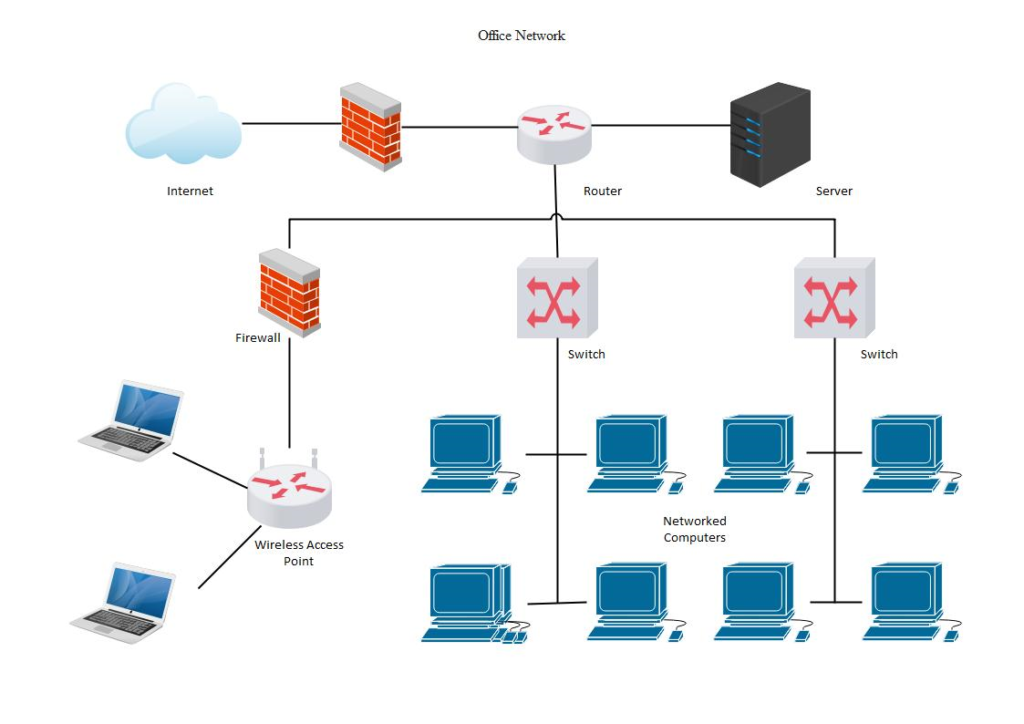
A strong network is essential for communication and productivity.
Start by designing a proper network topology. Then choose the right equipment such as routers, switches, and access points.
Ensure high-speed internet connectivity and secure configurations.
Configure IP settings, routing protocols, and implement security measures such as firewalls and access controls.
Regular monitoring and maintenance help maintain network performance.
Ensuring Security in Your IT Infrastructure
Security is a critical aspect of IT infrastructure.
Implement strong access controls to ensure only authorized users can access systems. Use multi-factor authentication for additional protection.
Encrypt data to prevent unauthorized access. Apply encryption to both stored data and data in transit.
Monitor systems regularly to detect suspicious activity. Set up alerts and response plans to handle security incidents quickly.
Cloud Solutions vs. On-Premises Infrastructure
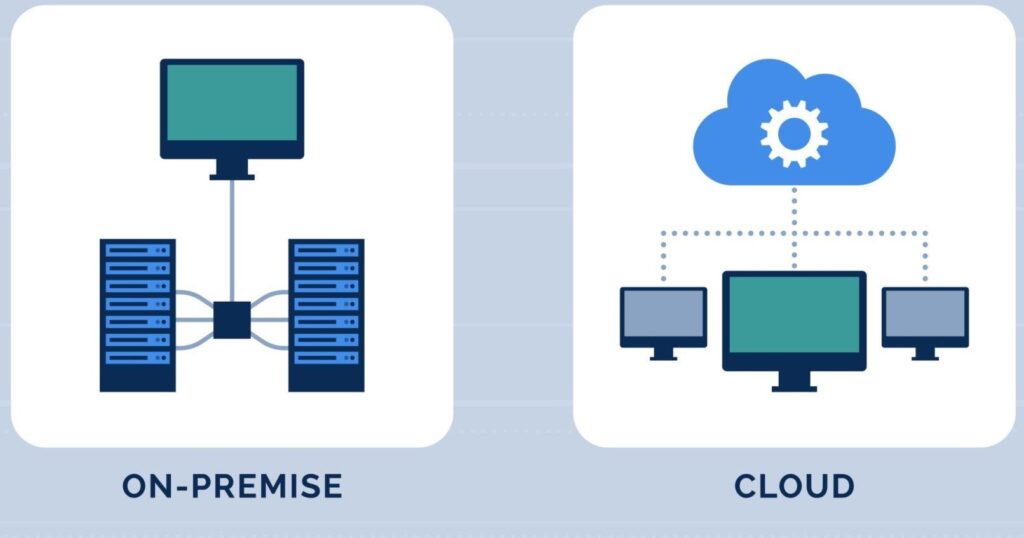
Businesses can choose between cloud and on-premises infrastructure.
Cloud solutions offer scalability, flexibility, and lower upfront costs. They also reduce the need for maintenance.
On-premises infrastructure provides better control, customization, and data privacy but requires higher investment and maintenance.
A hybrid approach combining both options is often the best solution.
Best Practices for IT Infrastructure Maintenance
Regular maintenance ensures smooth operations and prevents failures.
Follow these best practices:
- Update software regularly
- Monitor system performance
- Check hardware condition
- Perform regular backups
These practices help maintain system reliability and security.
Future-Proofing Your IT Infrastructure Setup
To stay competitive, businesses must plan for future growth.
Choose scalable solutions that can be expanded easily. Stay updated with new technologies and industry trends.
Adopting a hybrid approach can provide flexibility and long-term benefits.
Future-proofing ensures your IT infrastructure remains effective as your business grows.
Conclusion
Setting up IT infrastructure for a new office requires careful planning, the right technology, and ongoing maintenance. A well-designed system improves efficiency, enhances security, and supports business growth.
📞 Contact ALTF9 Tech
Need expert support for your IT infrastructure setup?
ALTF9 Tech provides reliable and scalable IT solutions for businesses.
👉 Contact us today for a free consultation.
📧 Email: Contact@altf9.tech
📞 Phone: +91-8056005901
🌐 Website: https://altf9.tech
FAQ
Q1: What is IT infrastructure?
IT infrastructure includes hardware, software, and networks used to run a business.
Q2: Why is IT infrastructure important?
It supports business operations, improves efficiency, and ensures security.
Q3: Which is better, cloud or on-premises?
A hybrid approach is often the best option.
Q4: How can I secure my IT infrastructure?
By using firewalls, encryption, and access controls.
Q5: How often should IT systems be updated?
Regular updates are recommended to maintain performance and security.